
Redeem Shrapnel Extraction Pack Codes and Join STX1 Fast
Step-by-step guide to redeem your Extraction Pack code for Shrapnel, install via the Epic Games Store, link accounts and jump into STX1—fast, clear, no fluff.
TL;DR
- You need an Extraction Pack (codes from social giveaways or GAM3 Quests) to access STX1 content.
- Install the Epic Games Store (EGS) launcher, sign in or create an Epic account, then install Shrapnel when it appears.
- Launch Shrapnel and sign into your Shrapnel account — EGS and Shrapnel will auto-link and verify Extraction Pack ownership.
- If verification fails, use the Shrapnel Marketplace to redeem or purchase an Extraction Pack, then return to the lobby and press Deploy.
What You Need to Know First
Short version: possession of an Extraction Pack is the gate. You can get one from giveaways or complete GAM3 Quests. We’ve given out over 25K codes so far, so yes, the devs like giving things away — be ready when they do.
| Item | Effect | Where to Get |
|---|---|---|
| Extraction Pack | Required for participating in STX gameplay events and unlocks related content | Social media giveaways, GAM3 Quests, Shrapnel Marketplace |
| Epic Games Store (EGS) Launcher | Platform required to download and run Shrapnel | epicgames.com (download the launcher) |
| Epic Games account | Used to sign into EGS and link to your Shrapnel account | Create or log in at epicgames.com |
| Shrapnel account | Game login that triggers verification of Extraction Pack ownership | Create when you first launch Shrapnel or sign in at game login screen |
| Proof of Code | The code or giveaway link that proves you own an Extraction Pack | Check giveaway email, GAM3 Quests dashboard, or your account inbox |
Before you start: check any giveaway email or GAM3 Quests messages for redemption instructions. Some codes are one-time use and may include a direct redemption link — don’t assume it magically appears in your account without following the steps provided.
Step-by-Step Guide
Follow this in order. If you skip something, you’ll waste time like a rookie trying to hotwire a tank.
-
Download and install the Epic Games Store (EGS) launcher from epicgames.com. EGS is mandatory for Shrapnel installs.
-
Sign in to EGS or create an Epic Games account if you don’t have one. Use a real email you check — redemption emails go there.
-
Watch the Epic Games Store for the Shrapnel listing. When Shrapnel is available, click the store page and install the game to your library. Make sure you meet any platform prompts.
-
Launch Shrapnel from the EGS launcher. On first run you’ll see the Shrapnel login screen. Create or sign into your Shrapnel account here.
-
When you log into Shrapnel, your Epic Games account and Shrapnel account will automatically attempt to link. This is the verification step that checks whether you own an Extraction Pack.
-
If the automatic verification finds an Extraction Pack tied to your account, you’ll be sent to the main menu. If not, you’ll be redirected to the Shrapnel Marketplace to redeem or purchase one.
-
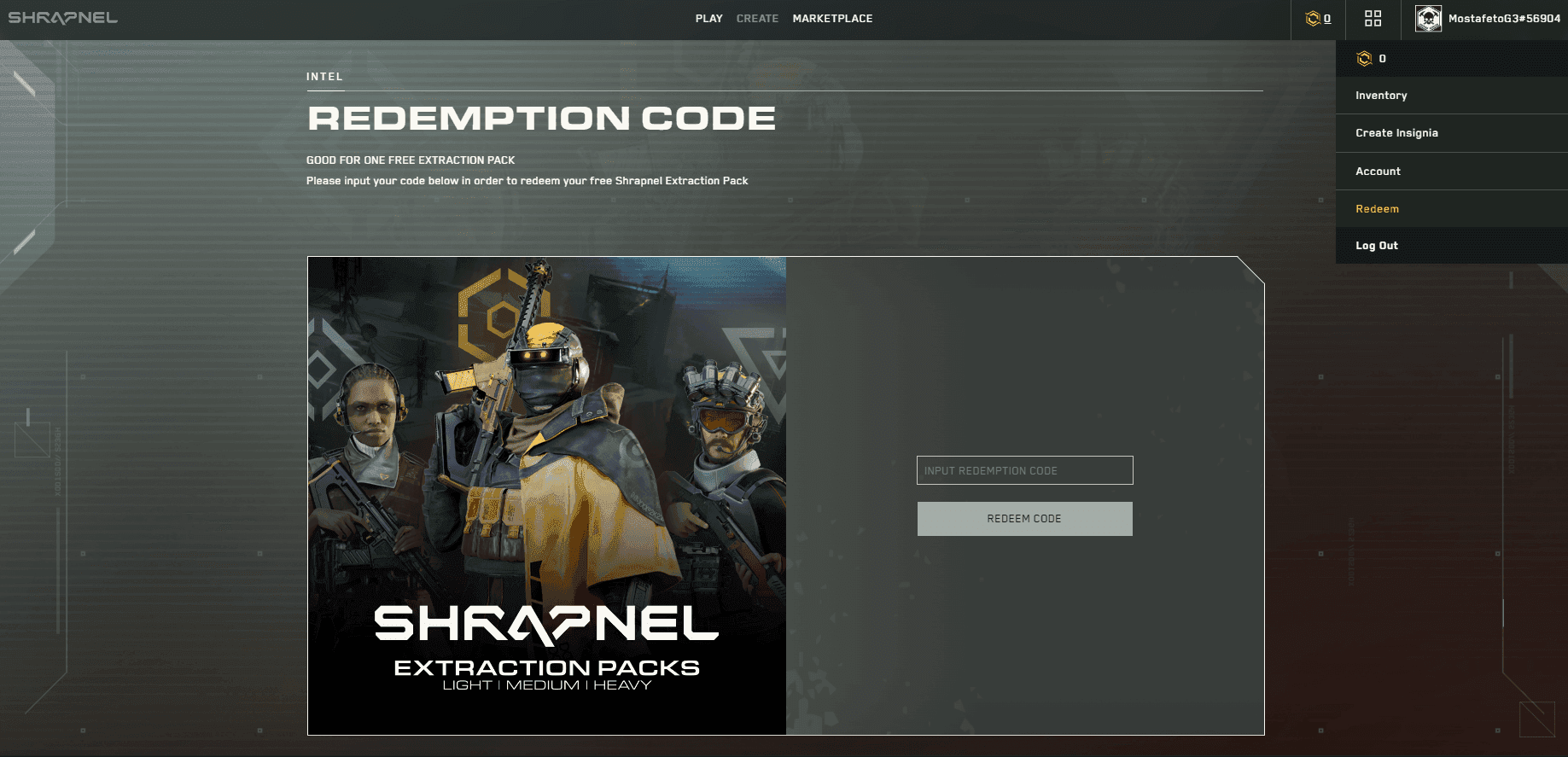
Redeem your code exactly as the giveaway or GAM3 Quests instructions specify. Most giveaways either give a direct redemption link or a code to paste into the Marketplace. If the giveaway email included a claim link, use that first.
-
After redeeming in the Marketplace, return to the main menu and click Continue to proceed to the lobby.
-
In the lobby, set up your loadout if you want, then press Deploy to enter matchmaking. Wait for the match to fill and you’ll drop into STX1.
-
Troubleshooting: if linking fails, log out of both EGS and Shrapnel, clear caches, and log back in. Check the email that carried your code for redemption steps or support contacts.
Useful UI quick-reference:
| Button | Effect | Where |
|---|---|---|
| Continue | Moves from verification/main menu to the lobby | First-time screens / Main menu |
| Deploy | Starts matchmaking for STX | Lobby |
| Marketplace | Buy or redeem Extraction Pack | Main menu or verification redirect |
If you run into an error that says your code is invalid, double-check the source, confirm you didn’t mistype characters, and verify the code hasn’t already been claimed. If everything looks correct and it still fails, open a support ticket with the giveaway organizer and Shrapnel support — they’ll need the code and the email you used.
Pro Tips
- If a giveaway gives a claim link, use it right away. Some links expire or are single-use — procrastination is how you lose a free Extraction Pack.
- Keep the email tied to your Epic Games account and Shrapnel account consistent. Mismatched emails are the #1 reason auto-link verification fails.
- If you plan to play on a new PC, redeem the code on the account before swapping machines. Codes attach to accounts, not hardware.
- Use EGS's verify/repair option if Shrapnel crashes on launch after install. It fixes corrupted files faster than reinstalling everything.
- When in doubt, take screenshots of the redemption success screen and your Marketplace purchase history. It’s small evidence that saves you hours with support.
Common Mistakes to Avoid
- Trying to redeem a code on the wrong email account or making a typo when entering the code.
- Assuming EGS and Shrapnel will link instantly — sometimes you need to relaunch both apps.
- Not checking the giveaway’s instructions — some require a specific redemption page or sequence.
- Waiting to redeem a claim link that expires or is single-use.