
Deadrop Snapshot VI — Cleaner Squads, Settings & Tips
Deadrop Snapshot VI for View All: key settings, Cleaner squads, loot-bag handling, stash tricks, movement tech and Proving Ground tips to boost your extraction.
TL;DR
- Snapshot VI adds Cleaner squads, better comms, and the Proving Ground — bodies and Death Bags get collected fast, so loot quickly.
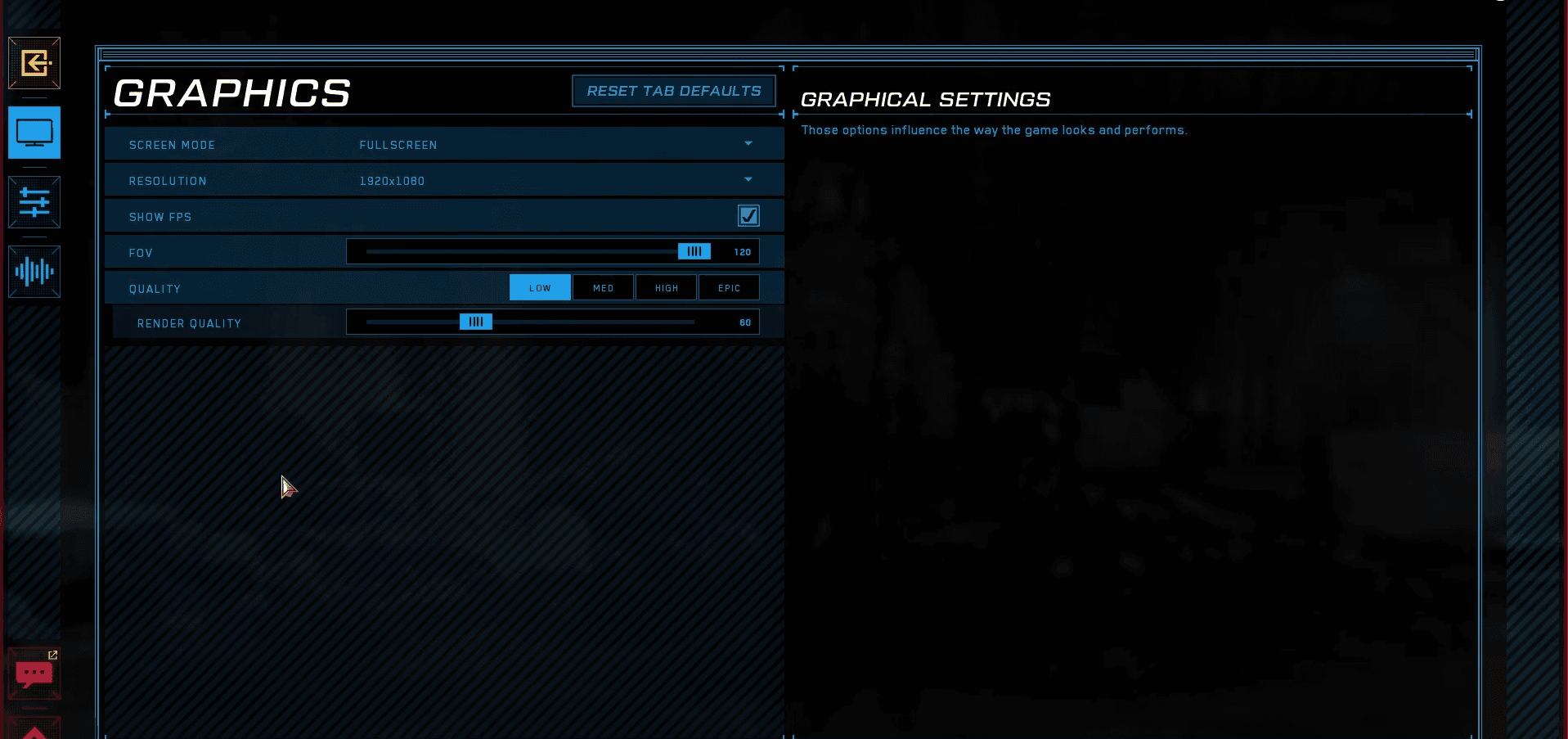
- Lower graphics: full screen, match Resolution, FOV 120, Quality low, Render Quality 50–70 to maximize FPS in pre-alpha builds.
- Use 'F' to pick up Death Bags, split ammo/bandages with Ctrl + drag, stow your weapon to run faster, and jump ziplines early.
- Stash cap is 250 — attach every possible attachment to one weapon to reduce item count and squeeze more loot in.
What You Need to Know First
Before you drop in: Deadrop is pre-alpha and Snapshot VI changed a lot. Cleaner squads actively collect bodies and unlooted Death Bags, so you don't get unlimited time to strip a kill. Comms let Claws and Variants squad up and track each other; friendly fire avoidance exists, but don't rely on miracles.
| Item | Effect | Where to Get |
|---|---|---|
| Snapshot VI | Adds Cleaner squads, comms, Proving Ground | Live build (pre-alpha) |
| Cleaner squads | Collect bodies and Death Bags quickly | Spawn in raids after Snapshot VI |
| Death Bag | Lootable bag from dead players | Pick up with 'F' in-raid |
| Adrenaline Spray | Temporary movement boost & damage reduction while applying | In-raid loot / stash |
| Stash cap 250 | Game won't start if stash > 250 items | Your account stash UI |
Minimum expectations:
- Familiarity with looter-shooter basics (opening doors, looting fast, extraction timing).
- Ability to use basic keybinds: 'F' to pick up Death Bags, Ctrl for split-dropping items.
Recommended: run a few low-risk raids to get comfortable with inventory speed. Snapshot VI moves fast — if you like looting slow and smelling the virtual roses, this patch is going to stomp on that dream.
Step-by-Step Guide
-
Tweak graphics first (do this before you complain about frame drops).
-
Open Settings > Graphics and apply the following baseline:
Setting Recommended Screen Mode Full screen Resolution Match your monitor FOV 120 Quality Low Render Quality 50–70 -
Save changes and restart the client if you see stutters.
-
-
Change your in-game name (optional but handy). Log into the Midnight Society website, click the claw icon top-right, go to 'Profile', edit your in-game name in the Founder Profile section and hit 'Submit'. Yes, it’s annoying, but it works.
-
Inventory hygiene: splitting and stash tricks.
- Split items: left-click and drag an ammo stack or bandage into an empty slot, hold down 'Ctrl' before releasing to split.
- Stash limit: the game blocks launches if your stash exceeds 250 items. To compress item count, take a weapon in your stash and attach every compatible attachment via shift-clicking attachments onto it. That reduces the number of separate items listed.
Item Effect Where to Get Weapon + attachments trick Reduces visible item count in stash Your stash UI Ammo/Bandage split Share with teammates quickly In-raid inventory -
Loot bags and death handling.
- Press 'F' to pick up a Death Bag. Don't stand around; Cleaner squads will sweep known corpses. If you pick it up, move to a safe spot to go through the loot.
- Carrying another player's loot makes you a priority; plan an extraction route before you open the bag.
-
Movement tech and survival.
- Zip lines: jump a few feet before the end, then jump again just before landing for a short speed burst. Works better than pretending the zipline is a public service.
- Stow weapon to run faster when you need to disengage.
- Lean while ADS: set lean binds how you like them — makes you harder to hit while keeping sight on targets.
- Proving Grounds 2 map: climb the green vines with the interact button. They’re obvious but don't be flashy; misuse can throw you off.
-
Using Adrenaline Spray.
- Adrenaline Spray gives a temporary movement boost and reduces incoming damage while applied. It takes time to use; find cover first. This is a get-out-of-jail card, not a 'charge headfirst into three guys' strategy.
-
Extraction checklist (quick):
- Did you stash attachments onto a weapon to free space?
- Any Death Bags you grabbed — are they secured or still open in the middle of an alley?
- Are you visible on comms to squadmates? Friendly comms are good; false confidence is not.
Pro Tips
- Rotate loot compression: every few sessions, consolidate attachments on a low-value weapon in stash so you don’t hit the 250 cap mid-session.
- Use small covers when applying Adrenaline Spray; the animation slows you down and gets you killed if you’re exposed.
- If a Cleaner squad spawns on a corpse you want, bait them with a decoy route: pick the bag up, move off-angle, then vault cover — Cleaners stick to predictable paths.
- Practice zipline jumps in a low-risk map. The timing for the double jump speed boost is tight but reliable once muscle memory kicks in.
- Lean-ADS with pre-bound keys and practice peeking in firing lanes. You’ll take fewer hits and still land shots; learning peek timing > raw sensitivity fiddling.
Common Mistakes to Avoid
- Leaving a Death Bag in the open to loot casually — Cleaner squads will grab it faster than you can say 'oops'.
- Keeping your stash at 249 items and assuming you’re safe — one extra pickup blocks matchmaking if you’re at 250+. Clean up proactively.
- Using Adrenaline Spray mid-fight while exposed — it slows your movement during application, which is when you need mobility most.
- Expecting graphics defaults to be fine in pre-alpha — Quality high + unstable build = frame drops and input lag, which look like bad aim.